






Sticking with a legacy ERP feels safe. It is the central nervous system of your company. It houses every order, customer profile, and financial record.
Leaders look at that stability and decide the risk of a shutdown just isn’t worth it.
But that stability is actually a hidden tax on your growth. Behind the scenes, your team is likely burning hours every day manually moving data from an aging database into modern apps.
You end up paying for human middleware. That is skilled talent wasted on data entry tasks that a computer should handle in milliseconds.
Modernization approach is usually too expensive and creates more problems than it solves.
Instead of throwing the old system away, the smarter move is building a reliable bridge between that legacy data and new tools.
Here is the 5-step framework we use to connect your operations without ever pulling the plug on what currently works.
Why Staying Put Is Costing You
Finance teams usually defend an old ERP by pointing at the massive bill for a new one. They rarely measure the price of staying put.
The maintenance trap
Legacy systems often swallow 80% of an IT budget just to keep the lights on. On a $250,000 annual spend, that is $200,000 going toward survival rather than growth.
That number isn’t static. Technical debt grows every year. The longer you wait, the more manual workarounds your team builds. Eventually, those temporary fixes become the only thing holding your operations together.
The productivity drain
The real expense isn’t the software license. It is your payroll.
When data doesn’t flow between tools, your staff fills that gap by hand. Finance and operations teams frequently burn four to six hours a day on reconciliation. They are exporting files, matching rows, and fixing mistakes on data that already exists somewhere else.
As transaction volume grows, the only way to keep up is to hire more people. You end up scaling your headcount to solve a problem your software should have handled years ago.
The data lag
If closing the books takes three days, or inventory levels take 48 hours to show up in a report, you are making decisions on stale data.
Competitors with integrated systems spot supply issues and update forecasts in hours. The difference isn’t talent. Their data is just fresher than yours.
How to Integrate a Legacy ERP Without a System Blackout
If you want to modernize without a business blackout, you need a transition architecture. Here is how you actually bridge the gap between a 20-year-old mainframe and a modern cloud ERP.
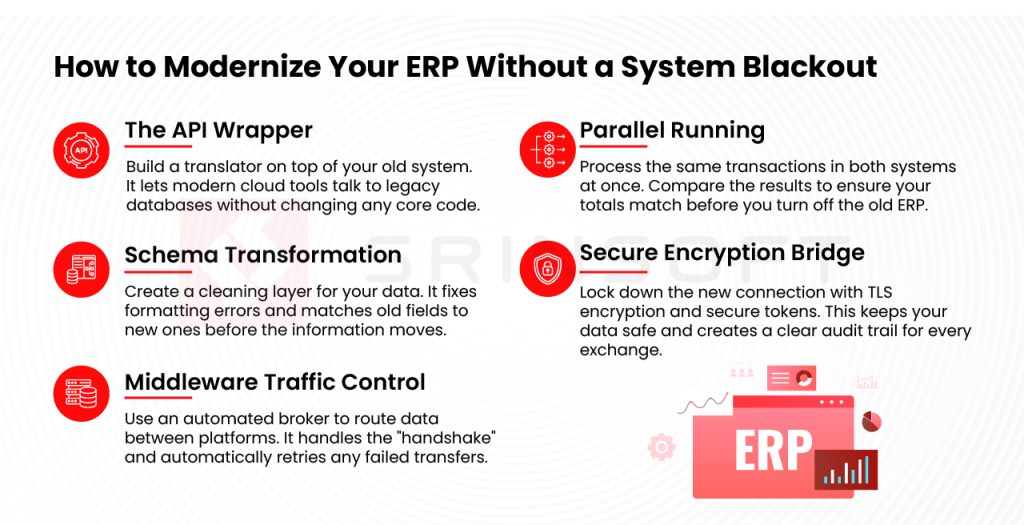
1. The API Wrapper: Translating the “Black Box”
Legacy systems like an AS/400 often lack native APIs. You cannot “plug in” to them easily.
Instead of rewriting the core code, which is where the risk lives, you build a wrapper. This is a microservice sitting on top of your legacy database. It listens for modern REST calls from your new ERP and translates them into the flat-file commands your old system understands. Data moves on demand, not in scheduled batches that can desync.
2. Schema Transformation: Cleaning the Source
A modern ERP and a legacy system rarely speak the same language. One might use a single “Customer_Name” field while the other expects “First_Name” and “Last_Name.”
This is where you build a transformation layer. It doesn’t just move data; it validates it. It strips out duplicates, reformats dates, and converts legacy internal codes into readable values. If the data is “dirty” in the old system, this layer catches it before it can corrupt your new environment.
3. Middleware: Your Traffic Controller
When systems cannot talk directly, you need an Integration Platform (iPaaS) like MuleSoft or Dell Boomi.
Think of this as your automated middleware. These platforms receive the data, reformat it, and route it to the right endpoint. If a server blips or a transfer fails, the middleware handles the retry logic automatically. You do not lose an invoice just because a connection timed out for three seconds.
4. Parallel Running: The Safety Net
In high-stakes environments, you do not just switch systems. You run both.
You process the same transactions in the old and new ERP simultaneously and compare the outputs.
- Do the inventory counts match?
- Are the tax calculations identical?
If the totals diverge, you find the bug in the mapping and fix it. You only decommission the old system once both platforms tell the exact same story for a full month of reporting.
5. Securing the Bridge
Connecting an on-premise server to the cloud opens a door that did not exist before.
Every byte moving through that path needs TLS encryption. You should also move away from open network permissions and use secure, time-limited tokens for system access. If something breaks, every exchange must be logged at the integration layer so you can audit exactly where the handshake failed.
The Zero-Downtime Technical Checklist
Before moving live data, your technical lead needs to verify these five areas. This is how you prevent a migration from hitting your bottom line.
1. API Gateway Configuration
- Deploy a dedicated gateway to manage traffic between on-premise and cloud environments.
- Set rate limits to prevent request spikes from overwhelming the old server.
- Use token-based authentication so only verified systems can touch the database.
2. Data Integrity Audit
- Hunt down orphaned records and broken relationships before they throw errors in the new environment.
- Map every connection: orders to customers, customers to invoices, and invoices to GL accounts.
- Identify a single “system of record” for every data category before the cutover.
3. Message Queue Setup
- Place an async message broker between the systems so the new platform never has to wait for the old server to respond
- Set retry logic with exponential backoff. If a transfer fails, the system should re-attempt gradually instead of flooding the source.
- Use dead letter queues to catch failing messages so they don’t block the rest of the pipe.
4. Latency Benchmarking
- Measure the round-trip time between your local servers and the cloud under a heavy load.
- Aim for a sync delay of under one second for critical order and stock data.
- If the lag is too high, look at a dedicated network line instead of standard internet routing.
5. The Rollback Plan
- Confirm the legacy database supports point-in-time recovery through logs or snapshots.
- Run a full rollback test in a staging environment. Do not wait for a real incident to see if it works.
- Define the exact “point of no return” conditions so the call to roll back isn’t made under panic.
A Practical Roadmap for Integration
The most reliable way to modernize is a phased rollout. Trying to move every department on a single Monday morning is a recipe for a blackout.
Instead, use a timeline where each phase must be stable before the next one starts.
Phase 1: Build the Foundation (Months 1–4)
The first four months should be invisible to your employees. Nothing about their daily workflow changes. Behind the scenes, the technical heavy lifting happens:
- The legacy database gets audited for broken records and disconnected data.
- The API gateway is configured and secured.
- A background sync begins. Every transaction in the old system is copied to the new one to test the connection.
If a mapping is wrong or a format doesn’t match, it surfaces in a test environment. Your live business operations are never affected.
Phase 2: The Low-Risk Pilot (Months 5–10)
Once the background sync is stable, move one department onto the new platform. Choose a team with lower transaction volume rather than starting with Finance or Logistics.
In this phase, the connection becomes two-way. A change in the new system updates the old one, and vice versa. This is when you find the “hidden” problems:
- Undocumented workflows and manual spreadsheets finally come to light.
- The connection gets pressure-tested under actual daily volume.
- A small group of experienced users gets trained to act as internal support for the next phase.
Phase 3: Departmental Rollout and Wind-Down (Months 11–18)
Move Finance, Manufacturing, and Logistics over one at a time. Because both systems have been running side-by-side for months, the actual switch for each team should be uneventful.
Do not turn off the old system on go-live day. Keep it in read-only mode for at least two full fiscal quarters. You will need it for:
- Accessing tax records and audit data tied to pre-migration history
- Referencing historical reports that might not have carried over perfectly.
Only decommission the legacy system once the new platform has successfully handled two quarter-end closes without an issue.
Moving Forward
There is no perfect budget window or slower quarter coming. Organizations waiting for the “right time” usually find themselves five years later with the same problems, except their best talent has moved on and the gap with competitors has widened.
Every day spent on a disconnected legacy platform carries a literal cost. It shows up in slow reporting, a finance team buried in manual reconciliation, and experienced staff burning out on software that hasn’t changed in a decade.
The companies pulling ahead right now are the ones that built a connection, kept what worked, and gave their teams better tools to handle the same job.
When that bridge is in place:
- Your team handles more volume without adding headcount.
- Data errors get flagged and fixed automatically.
- The business never has to shut down to stay current.
Your data and your customers are already there. The only missing piece is the connection that lets them work together.
Do not wait for a system breakdown to force your hand. Build the bridge now, keep the core running, and let your business move at the pace it is actually capable of.