






Executives ask for Power BI because they want the same things every leadership team wants: self-service access, clean visuals, mobile dashboards, and answers that don’t require a ticket to IT. The request is reasonable. The reaction that follows often isn’t.
IBM i still carries a reputation problem. Many people outside the platform treat it as fundamentally incompatible with modern analytics. The green-screen history, the specialized skill set, and IBM’s decision to withdraw its Db2 Web Query reporting tool from marketing in 2023 all reinforce the idea that the only way forward is replacement. Once that assumption takes hold, the conversation quietly shifts from “how do we improve reporting” to “how do we get off IBM i.”
Fortra’s 2025 IBM i Marketplace Survey shows how far that leap is from reality. Forty-five percent of respondents planned no change to the platform at all, and taken together, around two-thirds planned either no change or to expand their IBM i footprint. Only a small minority were planning a full migration away from it. Yet the moment Power BI enters the discussion, multi-year migration projects appear on the table.
Better reporting and platform replacement are two different decisions. Treating them as one is the expensive mistake.
What Native Power BI Integration Actually Means
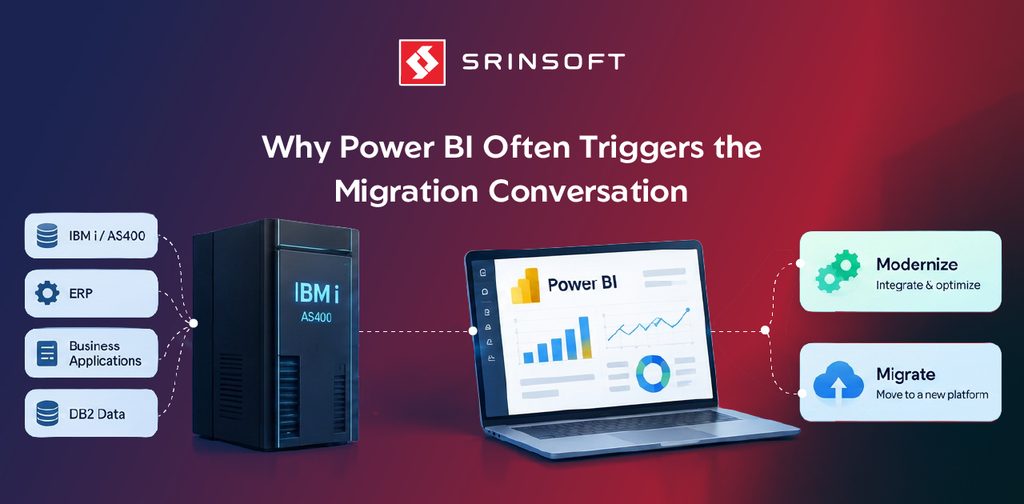
“Native” here is simple: Power BI talks directly to the data already sitting on IBM i. No mandatory data warehouse. No nightly copy of everything into another system. No requirement to rewrite the ERP or move the applications that run the business.
Once that direct connection is in place, Power BI reads the data that already exists on the system. The division of labour is clean.
What stays on IBM i:
- The data itself
- The business logic and validation rules
- Security and user-authority models
- Transaction processing and day-to-day operational reliability
What Power BI takes on:
- Data modeling and relationships
- Measures and calculations
- Interactive visuals and dashboards
- Distribution, mobile access, and self-service exploration
IBM i stays the system of record. Power BI becomes the presentation and analysis layer on top of it. Nothing here forces a full data migration or an application rewrite as the starting point.
This is the part most migration conversations skip. Teams jump to “we need a modern data platform” before testing whether a direct connection already solves the reporting problem they actually have. In many cases it does. Focused departmental dashboards often appear in weeks rather than years, because the heavy work stays inside the reporting layer instead of requiring new application code or a full platform change.
The approach is deliberately conservative. Keep the system that already runs the business. Modernize only the layer that executives and managers actually touch every day.
READ MORE: Top Signs Your IBM i System Is Holding Back Business Growth
How These Projects Succeed or Fail
The connection itself is straightforward. What separates a project that delivers from one that frustrates everyone comes down to a few decisions, and none of them require you to be technical to understand.
The first is how often the data refreshes. Most organizations schedule the data to update on a set cadence, say, every morning, or a few times a day. Dashboards stay fast, and the IBM i system that’s busy running the business isn’t slowed down by constant reporting queries. For the large majority of executive and departmental dashboards, this is exactly right.
Live, up-to-the-second dashboards are possible when the business genuinely needs them, but they come with a cost. Every click and filter reaches back into the production system, so performance depends heavily on how well the underlying data has been prepared. This is where projects most often go wrong: pointing live dashboards at messy, unprepared data produces slow reports and irritated users. The fix is to be honest about whether you actually need real-time numbers. Most decisions don’t.
Two patterns show up in nearly every successful project. Start narrow: a small, well-organized set of data produces useful dashboards far faster than trying to expose the entire database at once. And treat the connection as real infrastructure, not a one-off IT task, because when it fails, every report fails with it.
Native integration works. It works best when these choices are made with the same discipline applied to any other system executives rely on daily.
Is Native Integration the Right Choice for Your Organization?
The decision gets simpler once you separate the goal from the architecture.
Native integration is the right fit when the real need is better analytics, faster answers, and self-service access, and the core IBM i system is still doing its job. In that situation, replacing the platform to improve reporting is solving the wrong problem at the wrong cost.
Migration, or a broader hybrid strategy, becomes the stronger path when the drivers are bigger than reporting: modernizing the applications themselves, a deliberate move away from a shrinking pool of specialized skills, a cloud-first strategy, or a fundamental redesign of how the business runs. In those cases, reporting is only one symptom, and changing the reporting layer alone won’t address the real constraint.
A practical test helps. If the business can run successfully on the current platform for the next three to five years, native Power BI integration usually delivers the fastest, lowest-risk improvement. If the platform itself is becoming a genuine strategic liability, native reporting can still buy time and deliver value now, while a proper migration is planned and funded on its own timeline.
Many organizations do both. They put native Power BI dashboards in place now, reduce the daily friction leadership feels, and keep the larger platform decision on its own schedule. The two efforts don’t have to compete.
The costly mistake is letting a reporting request automatically trigger a multi-year platform program. Match the solution to the actual problem. That’s the decision that protects both the budget and your credibility.
The Skills Question Is Real, and Worth Being Honest About
One reason the migration reflex exists is legitimate, and it’s worth naming rather than dismissing. The pool of specialized IBM i skills is shrinking as experienced people retire, and that concern is rising year over year in the same Fortra survey. It’s a real strategic issue.
But it’s a separate one. Native Power BI integration doesn’t solve the skills question, and it doesn’t pretend to. What it does is stop that long-term concern from forcing a rushed, expensive reporting decision today. You can give the business the visibility it needs now, and address the platform and skills strategy deliberately, rather than bundling both into one large program under the pressure of outdated reports.
Conclusion
Better reporting does not require a new platform.
When the real pressure is clearer dashboards, faster answers, and less dependence on IT for every question, native Power BI integration with IBM i is often the more disciplined choice. It keeps the system that already runs the business and modernizes only the layer leadership actually uses. The data stays where it is. The applications keep running. The reporting layer simply stops being the bottleneck.
The organizations that handle this well keep two questions apart: whether the business needs better visibility, and whether the underlying platform still fits the company’s long-term direction. Solving the first doesn’t force the second. Often it buys time, reduces daily friction, and lets leadership decide the platform question on its actual merits.
That separation is the real value. It protects the budget, limits risk, and keeps the focus on the decision the business actually needs to make, rather than the technology project that felt inevitable but wasn’t.